
How to manage 100+ monthly listings without hiring more admin staff
Learn how Dubai brokerages manage 100+ monthly listings without expanding admin teams by automating portal publishing, approvals, documents, and listing workflows with Ruby CRM.
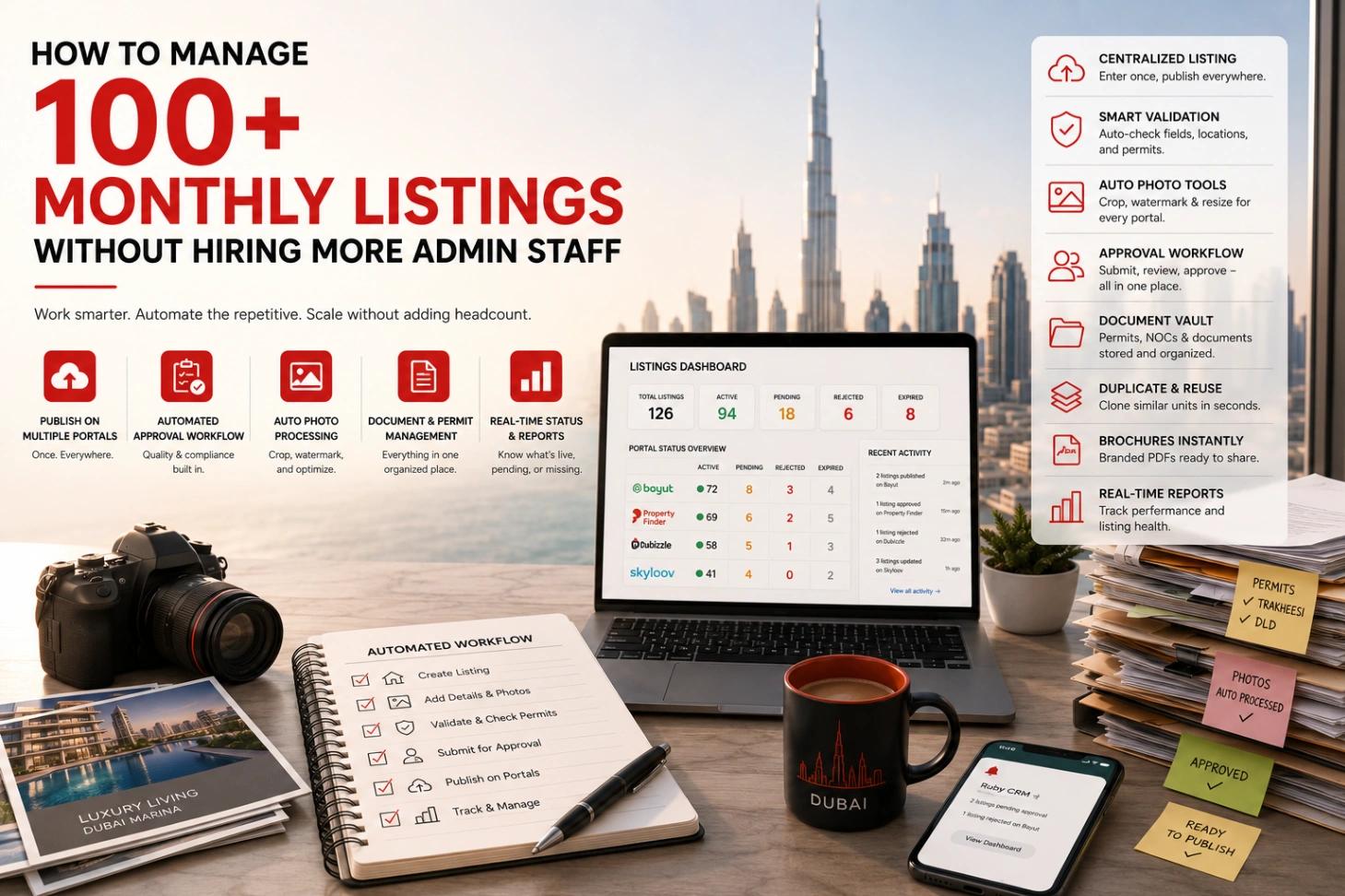
The usual assumption is that listing volume and admin headcount move together: double the listings, double the admin support needed to keep them all in order across portals, photos, approvals, and documents. That assumption is mostly wrong, and it's worth being specific about why. The brokerages that scale past a hundred active listings a month without adding admin staff aren't working harder than everyone else. They've removed the repetitive parts of the job that never needed a person doing them by hand.
The math nobody does before hiring
Put rough numbers on it once. Entering a single listing into one portal dashboard, with photos, features, and the location picked from that portal's own hierarchy, takes somewhere around fifteen minutes when nothing goes wrong. Multiply by four portals and it's an hour per listing. At a hundred listings a month, that's a hundred hours of pure re-typing, before counting photo cropping, brochure assembly, approval chasing, or checking four dashboards for rejections. A hundred hours is more than half of one full-time admin doing nothing but duplication, and the usual response to that load is to hire a second admin to duplicate faster.
The alternative is to notice that almost none of those hundred hours involve a decision. The same data gets moved from one place to four others, in four formats. That's not a job. That's a missing feature, and the rest of this piece walks through what it looks like when the feature exists.
Where the admin hours actually go
Ask an admin team at a growing brokerage what eats their week, and it's rarely the interesting parts of the job. It's re-typing the same listing into three or four portal dashboards, one field at a time, because each portal wants its own format. It's cropping and watermarking photos manually before uploading them, again, per portal. It's chasing a listing's approval status by asking a manager directly, since there's no single place that shows it. It's inventing a reference number and hoping it doesn't collide with one used last month. And it's building a brochure in a design tool from scratch because the listing data doesn't live anywhere that can generate one automatically. None of that work gets harder to do the hundred-and-first time. It just needs doing that many more times, which is exactly the kind of cost that should be automated away rather than staffed up.
Publish once, not four times
The single biggest source of duplicated admin work is publishing the same listing separately to Bayut, PropertyFinder, Dubizzle, and Skyloov. Each portal has its own location hierarchy, its own feature catalog, and its own required fields, which is normally why someone ends up re-entering the same property four times with four sets of portal-specific quirks to remember.
A centralized listing dashboard removes that entirely. An agent enters the property once, and publishing sends it to every selected portal at the same time, with Ruby building the correct payload for each one, checking required fields, matching locations to the right portal-specific hierarchy, and confirming permit numbers are in order before anything gets sent, since Dubai and Abu Dhabi listings need Trakheesi compliance on both Bayut and PropertyFinder. If Bayut accepts the listing but PropertyFinder rejects it for a missing field, the agent sees exactly which portal failed and why, rather than a single ambiguous error. Each portal's status, active, pending, rejected, expired, is then tracked independently, so a listing can be perfectly live on one portal and still working through approval on another, without anyone checking four separate accounts to know where things stand.
A quality gate that runs itself
More listings usually means more risk of something going live with a wrong price or a missing document, which is exactly the kind of thing that used to require an admin to manually review every submission before it published. An approval workflow handles this without adding a review bottleneck: an agent submits a finished listing, managers and admins are notified automatically, and the listing sits in a clear "pending approval" state until someone approves or rejects it, with a specific reason if it's rejected.
Editing a listing that's already live doesn't take it offline while changes are reviewed. The edit moves to a separate "draft changes" state, the original stays published exactly as it was, and once the change is approved, the update pushes out to every portal it's live on. Nobody has to chase approval status by asking around, since the state itself is always visible. In a market where an ad that doesn't match reality can turn into a RERA complaint, having every listing pass through a recorded approval step is compliance protection as much as quality control.
Photos that fix themselves
Every portal has its own aspect ratio requirements, and manually cropping and watermarking a full batch of listing photos for each one is exactly the kind of task that scales badly with volume. Handling this automatically means every uploaded photo gets cropped to the ratio portals expect and watermarked with the company's branding the moment it's uploaded, with the original always preserved untouched behind it. If the brand's watermark design changes months later, every existing image across every listing gets reprocessed in the background automatically, rather than someone manually reopening old listings to update old photos one by one.
Never retyping a similar unit
A brokerage listing several similar units in the same tower, or re-listing a property for rent after it was previously listed for sale, doesn't need to start from a blank form each time. Duplicating an existing listing copies every detail, photo, floor plan, and feature into a fresh draft in one click, with documents and portal history reset so it starts clean, while still linking back to the original for reference. What used to be twenty minutes of retyping becomes a single click and a few small edits. For a brokerage handling handovers in a new tower, where thirty nearly identical units hit the market in the same month, this one feature is the difference between a normal week and a hiring conversation.
Reference numbers nobody has to invent
A consistent, human-readable reference number matters for compliance and for client-facing materials, but manually assigning one to every new listing, and making sure it doesn't collide with an existing one, is another task that grows tedious at volume. Configuring a reference pattern once, built from components like property purpose, agent initials, and a sequential number, means every listing from that point on gets a correctly formatted, unique reference automatically the moment it's submitted for approval. Nobody invents a number, and nobody double-checks for duplicates.
Finding one listing among thousands
Past a certain volume, a simple list view stops being useful, and finding a specific listing by half-remembered details becomes its own small task. A search that tries an exact match first, falls back to full-text search across the title, description, reference number, and agent name, and finally catches typos through fuzzy matching means a listing turns up in seconds even with thousands active, and even if whoever's searching gets the spelling slightly wrong. A lightweight map view, showing only price, location, and a thumbnail for whatever's currently visible on screen, lets an agent see the whole portfolio geographically without waiting on a heavy page load.
Documents without a document team
Producing a brochure, an NOC, or a lease agreement used to mean pulling listing details into a design tool or a document template by hand, then doing it again in Arabic for a different client, then again for someone paying in US dollars instead of dirhams. Generating these directly from listing data removes the manual assembly entirely: a brochure in the client's preferred language and currency is built in seconds, cached so it doesn't regenerate unnecessarily, and shareable through a secure, time-limited link rather than an email attachment that circulates indefinitely. An NOC or lease agreement checks that all the required owner and agreement details are actually present before generating anything, and tells you specifically what's missing if they're not, rather than producing an incomplete document that needs fixing later.
This works from a phone too. An agent standing in a viewing can generate the Arabic brochure and share it in the client's WhatsApp thread before they've reached the parking lot, which used to be a "back at the office" task with a day's delay attached.
Watching every portal without logging into any of them
A hundred live listings across four portals is, in practice, four hundred things that could quietly go wrong: a listing rejected for a permit issue, a listing expiring without anyone noticing, a portal credit balance running low right before a publish is needed. Checking all of that manually across four separate portal accounts is exactly the kind of task that used to require a dedicated person watching dashboards all day.
Background jobs that periodically pull status directly from each portal's API mean a rejected or expiring listing shows up immediately inside one dashboard, quality scores and performance metrics update daily so underperforming listings get flagged automatically, and portal wallet balances refresh on their own so credits don't run out mid-campaign without warning. The admin's job shifts from finding problems to fixing the ones the system already found.
What admin staff actually end up doing instead
None of this means a brokerage needs zero admin support. It means the admin team stops spending its time on the parts of the job that were never about judgment in the first place, retyping, reformatting, manually cross-checking four portals, and starts spending it on the parts that actually need a person: reviewing borderline listings before approval, coaching agents on photo and description quality, handling the genuinely unusual case that doesn't fit a standard workflow. A brokerage that reaches a hundred monthly listings without adding headcount usually isn't running leaner. It's running the same team on work that's actually worth their time.
Frequently asked questions
How long does it take to publish one listing to all four UAE portals?
With centralized publishing, the agent fills in the listing once and pushes to Bayut, PropertyFinder, Dubizzle, and Skyloov in the same action; the marginal cost of each extra portal is a checkbox. Done manually, each portal is its own 10–20 minute data-entry job with its own quirks, so four portals means roughly an hour per listing.
Why do listings get rejected on Bayut or PropertyFinder?
The common causes are permit problems (a missing, expired, or mismatched Trakheesi number for Dubai listings), missing required fields, and location or category mismatches with the portal's own hierarchy. A system that validates permits and required fields before sending catches most rejections before they happen, and shows portal-specific errors when they slip through.
How many listings can one admin realistically manage?
Manually, across four portals with photos and documents, most admins max out somewhere between 40 and 60 active listings before things start slipping. With publishing, photo processing, references, and portal monitoring automated, the same person can oversee several hundred, because their job becomes reviewing exceptions instead of performing repetition.
Do agents still need their own portal logins?
For day-to-day work, no. Publishing, status tracking, lead capture, and wallet balances all surface inside the CRM. The portal accounts still exist underneath and stay accessible, but nobody needs to log into four dashboards to run a normal week.
If you're wondering how much of your own admin week is going to work that doesn't need a person, book a Ruby CRM walkthrough. Bring your current listing count; the hours saved are easy to calculate live.
Ready to Transform Your Real Estate Business?
Join hundreds of brokers using Ruby CRM to automate lead management and close more deals.